


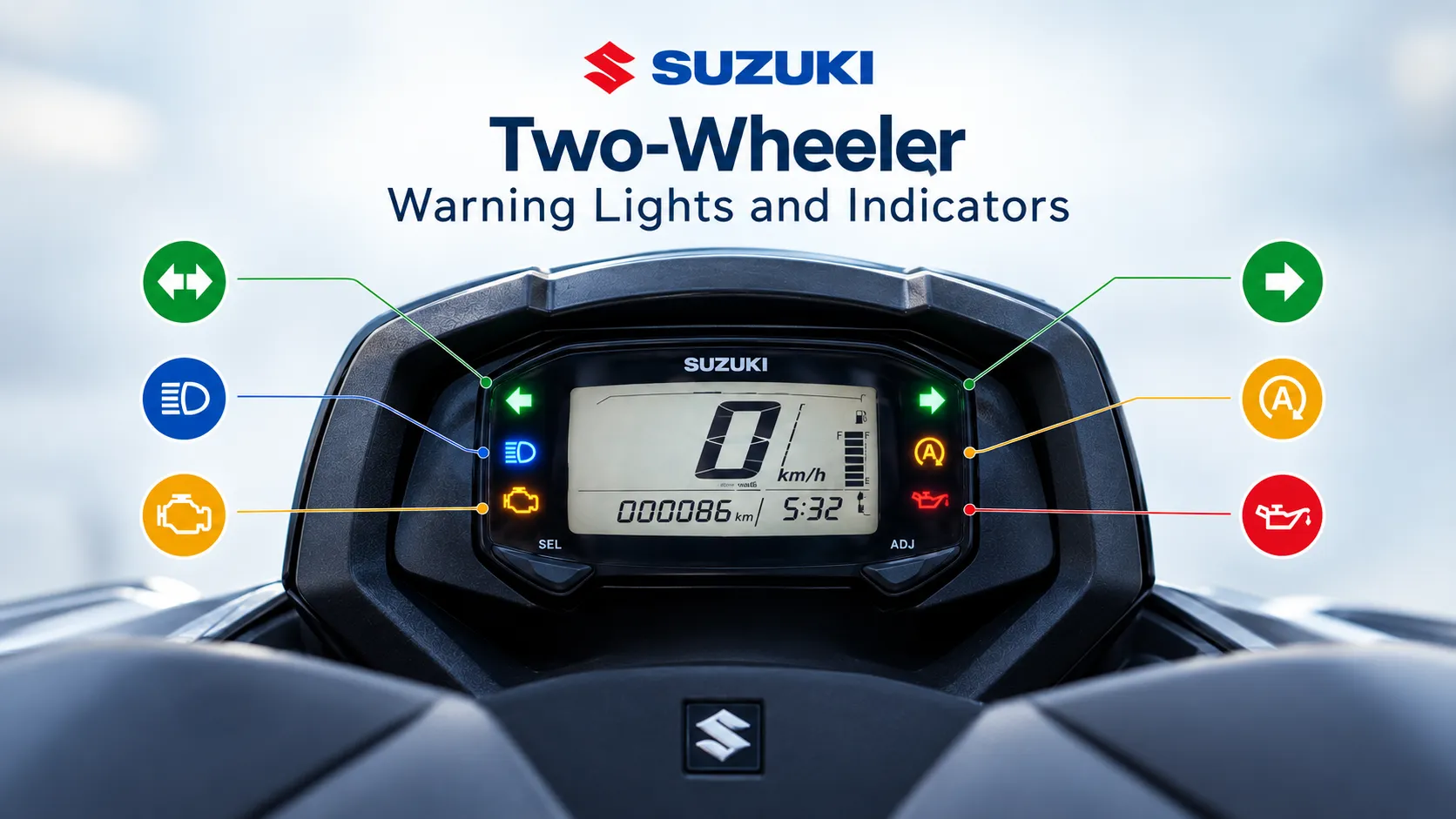
A symbol appears on your Suzuki’s instrument cluster. Is it simply telling you that the high beam is on, reminding you to refuel or warning you about a possible fault?
Suzuki two-wheelers use warning lights, indicators, reminders and information displays to show the vehicle’s operating status. Some confirm that a function is active, while others signal a condition that needs attention. Understanding these indications helps riders decide whether to continue riding, stop safely, recharge or contact an authorised Suzuki dealer.
Symbols, display behaviour and recommended actions vary by model, variant and model year. Always refer to the owner’s manual supplied with the vehicle.
Types of Instrument-Cluster Indications and Required Rider Action
Instrument-cluster indications fall into four broad categories:
| Category | Examples | Action required from the rider |
| Operating-status indicators | Turn signal, high beam, neutral, side stand, gear position, READY, reverse and drive mode | Confirm the vehicle’s current status and take the normal action, such as cancelling the turn signal or retracting the side stand. |
| Information displays | Fuel level, traction-battery state of charge, estimated driving range, speedometer, tachometer, clock, fuel or energy consumption and battery voltage | Monitor the display and act promptly, such as refuelling, charging or arranging an inspection if an abnormal value recurs. |
| Maintenance reminders | Oil-change indicator | Schedule the specified maintenance and reset the reminder as described in the owner’s manual. |
| Warning and malfunction indicators | Malfunction Indicator Light, Master Warning Indicator, ABS indicator, engine-temperature warning, traction-battery temperature warning, charging-system warning and power-limitation indicator | Follow the warning procedure. Stop safely when instructed and contact an authorised Suzuki dealer if the warning stays on. |
Is It Normal for Warning Lights to Appear at Start-Up?
Some lights illuminate briefly when the ignition or main switch is turned ON as part of a system self-check. They should disappear when their respective checks are complete, although they do not necessarily switch off at the same time. For example, the ABS indicator normally remains illuminated until the vehicle speed exceeds approximately 5 km/h.
Major Warning Lights
The warning lights below indicate important system conditions that may require the rider’s attention. While some lights are part of the normal start-up self-check, others may signal a fault that needs prompt inspection. Understanding what each indicator means can help you respond appropriately and ride safely.
Malfunction Indicator Light (MIL)
The Malfunction Indicator Light, commonly called the MIL, is linked to the engine-management system. It illuminates briefly when the ignition is switched ON as part of the initial meter check.
If the MIL remains illuminated or comes on while riding, the engine-management system may have detected an emissions-related fault. Contact an authorised Suzuki dealer immediately.
If the MIL blinks while the engine is running, stop safely and switch off the engine immediately to prevent catalytic-converter damage. If riding is unavoidable, keep the speed low, avoid wide throttle openings and arrange an immediate inspection.
Master Warning Indicator
The Master Warning Indicator alerts the rider to specified system faults, including non-exhaust-related engine-system failures. Depending on the model and fault, an accompanying message such as FI or CHEC may appear.
If the indicator illuminates, check the accompanying message and contact an authorised Suzuki dealer immediately.
ABS Indicator Light
On ABS-equipped models, the ABS indicator comes on when the ignition is switched ON and normally disappears after the vehicle speed exceeds approximately 5 km/h.
If it blinks or comes on while riding, ABS may not work, although conventional braking should remain available. Stop safely, switch off the ignition and wait a few minutes. Restart the vehicle. If the indicator does not disappear after the vehicle exceeds 5 km/h, ride cautiously and have the ABS checked by an authorised Suzuki dealer as soon as possible.
ABS does not replace safe riding practices. Maintain a safe speed and braking distance, and avoid sudden braking.
Engine-Temperature Indicator
Selected models have an engine-temperature indicator. It illuminates briefly when the ignition is switched ON. Some models display engine temperature through LCD segments.
If the engine temperature exceeds the specified limit, the indicator may remain illuminated or the temperature symbol may blink, depending on the model. Continued riding may cause serious engine damage. Stop safely, switch off the engine and allow it to cool. Do not restart the engine until the warning disappears. Check the engine-oil level if instructed in the owner’s manual.
Electric Scooter Warning Indicators
Electric scooters use dedicated warning indicators to monitor the traction battery, EV system, charging system and power output. Some indicators may appear temporarily during normal operation, while others can signal conditions that require the rider to stop, limit riding or seek professional inspection. The following indicators are particularly important for e-ACCESS riders to understand.
Traction-Battery Temperature Warning
On e-ACCESS, the traction-battery temperature warning comes on when the battery temperature is high. If it appears while riding, stop safely, switch off the EV system and do not ride until the warning disappears. If it appears while charging, stop charging.
EV Master Warning Indicator
The EV Master Warning Indicator may illuminate or blink because of an EV-system failure, after the scooter falls over, or when the traction battery is too hot or too cold for riding. FI! in the Information window indicates an EV-system-related failure, while TO! indicates that the scooter has fallen over. Consult an authorised Suzuki dealer to confirm that the scooter is safe to ride and have it inspected.
Charging-Condition and Electrical Charging Indicators
The traction-battery charging-condition light is green during charging, blinks green when charging is limited and turns red for a charging problem. The electrical charging indicator, shown as a battery symbol, comes on if the 12 V lead-acid battery charging system fails. Stop charging if a red charging warning appears and consult an authorised Suzuki dealer.
Power-Limitation Indicator
The power-limitation indicator shows that output is restricted to protect the motor, traction battery or EV system. If reduced power prevents safe riding, stop in a safe place. Charge the battery or allow the system to return to a normal temperature, as applicable.
Other Instrument-Panel Indicators and Reminders
| Indicator or reminder | When it appears | Recommended action |
| Turn-Signal Indicator | Blinks when the left or right turn signal is operated. It may blink faster if a lamp or circuit has failed. | Cancel the signal after turning. If it flashes unusually fast, have the turn-signal system inspected. |
| High-Beam Indicator | Illuminates when the headlamp high beam is selected. | Switch to low beam when required to avoid dazzling other road users. |
| Neutral Indicator | Illuminates when the transmission is in neutral on geared models. | No action is required unless the rider intends to select a gear. |
| Gear-Position Indicator | Displays the selected gear on equipped motorcycles. | Use it as riding information and confirm neutral through the neutral indicator. |
| Fuel-Level Indicator | Shows the approximate fuel remaining. The fuel mark or final segment may blink when the fuel level becomes low, depending on the model. | Refuel promptly before the fuel tank becomes empty. |
| Oil-Change Indicator | Illuminates when the initial or preset oil-change interval is reached. | Replace the engine oil and reset the indicator according to the owner’s manual. |
| Side-Stand Indicator | Illuminates when the side stand is in use on equipped models. | Retract the side stand completely before riding. |
| ECO Drive Indicator or Illumination | Appears when an equipped scooter is being operated within the predetermined fuel-efficient range. | No action is required; maintain smooth, fuel-efficient riding. |
| Engine RPM Indicator | Illuminates or blinks when the engine reaches the preset RPM on equipped motorcycles. | Use it as a gear-shifting guide and avoid operating the engine continuously at excessive RPM. |
| Call or Message Indicator | Appears when a call, message, calendar or navigation alert is received from a paired smartphone on equipped models. | Check notifications only after stopping safely. Never use a phone while riding. |
| Bluetooth Connection Indicator | Appears when the instrument panel is connected to a compatible smartphone. | No action is required unless the connection is lost and the related feature is needed. |
| Phone-Battery Status Indicator | Shows the remaining battery level of the connected smartphone. | Charge the smartphone when its battery level is low. |
| Navigation Indicator | Appears when navigation is active through the connected smartphone application. | Follow the guidance without looking away from the road. |
| Power/ECO Illumination | Blue means normal riding, green means ECO riding and white means regenerative charging. | No action is required; use it as operating-status information. |
| READY Indicator (e-ACCESS) | Appears when the scooter is ready to ride. | Confirm READY before turning the accelerator; remember that the e-scooter may be silent. |
| Reverse Indicator R (e-ACCESS) | Appears while reverse mode is selected. | Check the surroundings and reverse slowly as instructed in the owner’s manual. |
| Drive-Mode Indicator (e-ACCESS) | Shows RIDE A, RIDE B or ECO. | Select a mode suitable for the conditions; ECO prioritises driving range. |
| Traction-Battery SOC Meter (e-ACCESS) | Shows the remaining charge; the mark blinks below 25%. | Stop riding and charge the traction battery as soon as possible when the charge is low. |
| Keyless Indicator (e-ACCESS) | Shows the communication status between the keyless system and remote fob. | Refer to the owner’s manual if it remains on or blinks unexpectedly. |
| Charging-Inlet Connection Indicator (e-ACCESS) | Appears if the charging connector is connected when the scooter is not ready and the start switch is pressed. | Disconnect the charging connector before attempting to ride. |
The speedometer, tachometer, odometer, trip meter, clock, voltmeter, consumption meters, traction-battery SOC meter, estimated range and remaining charging time are information displays, not warnings. Monitor them and follow the model-specific instructions in the owner’s manual.
What to Do When a Warning Appears
- Identify the indication. Check the symbol, whether it is steady or blinking, and any accompanying message.
- Observe the vehicle. Note any loss of power, unusual noise, overheating indication or change in braking performance.
- Stop safely when instructed. Never diagnose a warning while riding.
- Refer to the owner’s manual. Follow the instructions specified for the exact model and warning.
- Do not ignore a persistent warning. Contact an authorised Suzuki dealer if the warning stays on, returns or accompanies abnormal vehicle behaviour.
